Key takeaways
- Use ChatGPT for HR drafting, summarizing, and structured thinking.
- Remove private and identifying details before putting HR information into any prompt.
- Build better prompts by including context, a role, an action, a format, and a tone.
- Check every output for accuracy, fairness, and appropriate tone.
- Keep people involved and accountable whenever AI affects an employment decision.
AI use in HR is growing, but it is far from universal. SHRM's State of AI in HR 2026 found that 39% of surveyed HR functions had adopted AI, while 54% had no plans to use it in HR that year.
That gap makes sense. Using ChatGPT for HR can save time on everyday work; the usefulness of the results depends on the decisions you make before and after the prompt. You need to choose the right task, protect the information involved, and review the output.
This guide shows you where ChatGPT can help, what to keep out of it, how to write more effective prompts, and when human judgment has to lead.
Where ChatGPT helps in HR work
While there are many use cases of how to use ChatGPT for HR work, the most effective uses often start with work you already understand and can judge. In an OpenAI and National Bureau of Economic Research (NBER) study of how people use ChatGPT, "rewrite this HR complaint" appears as an example of a work-related request. The paper states that the researchers classified messages by conversation topic and found that "Practical Guidance," "Seeking Information," and "Writing" are the three most common topics and collectively account for nearly 80% of all conversations. That is a useful clue on where to get started: drafting, writing, and cleanup are natural starting points.
ChatGPT can also help you organize your thinking. Some practical examples you might use as an HR practitioner are to structure a communications plan, pressure-test a policy for missing questions, or turn rough notes into an outline. If your organization provides an approved, secure tool, it can also be useful for summarizing or searching internal documents, shared drives, intranets, and knowledge sources. Here are a few examples of practical use cases being used across HR teams:
| HR task | What ChatGPT can do | What still comes from you |
|---|---|---|
| Job description draft | Organize responsibilities and requirements | The real role, pay range, and must-haves |
| Policy summary | Rewrite dense language in plainer terms | Confirmation that it matches the policy and applicable law |
| Onboarding email | Turn an outline into a complete draft | Accurate dates, access details, and company voice |
| Interview questions | Generate role-specific starting points | A lawful scorecard and removal of risky questions |
| SOP cleanup | Reorder and clarify existing steps; visualization as process map format | Confirmation that the process accurately represents current state |
| Internal document search | Surface relevant matches in supplied, approved internal material | Access controls for different types of data and documents, and the final business decision based on the information returned |
In all of the above use cases, you must review the output and make decisions based on your HR experience and expertise. If you're just getting started, a good starter task has a low cost of error, contains no sensitive data, and produces a draft you are qualified and able to review. If the real task is deciding what should happen to a particular person, ChatGPT should not make that call.
[[cta-big]]
What to keep out of ChatGPT
Before you paste anything from work, confirm which account and workspace you are using. OpenAI's business data privacy guidance says content from ChatGPT Business and Enterprise is not used to train its models by default. For personal services such as Free and Plus, whether content may be used to improve models depends on your data controls.
That difference matters, but a business account does not make every HR prompt appropriate. Enterprise workspaces can support compliance logging of user prompts and responses, according to OpenAI's administrator documentation. Your employer's retention rules, approved uses, and access controls still apply. See your organization's internal AI policy for guidance.
| Account | Training default | Practical HR rule |
|---|---|---|
| Free or Plus | Depends on personal data controls | Use only non-sensitive, anonymized information |
| Business | Business content is excluded from training by default | Follow workspace policy and keep identifying details out |
| Enterprise | Business content is excluded from training by default | Follow configured retention, logging, and access policies |
Jenelle Buatti, Membership Success Director at the Institute for Corporate Productivity, gives public tools a memorable label in our AI for HR Professionals course: "Public models are red lights. No sensitive data ever." Her gut check is equally useful: "A good gut check is if you wouldn't want that information searchable on Google. Don't put it in a public model."
Remove these details before you prompt any general-purpose AI tool:
- Names, personal email addresses, and employee ID numbers
- Social Security numbers or other government identifiers
- Demographic data tied to an individual
- Exact compensation tied to an individual
- Medical information and accommodation details
- Performance review notes that commonly include identifying information
- Investigation notes, disciplinary records, and other sensitive case files
- Small-group data that could reveal who someone is
An approved business tool may offer stronger controls, but your organization's policy should decide what data and tasks are permitted. If you cannot confirm that policy, keep the prompt general and anonymized until IT, security, or legal provides you with a clear answer.
How to write a useful HR prompt
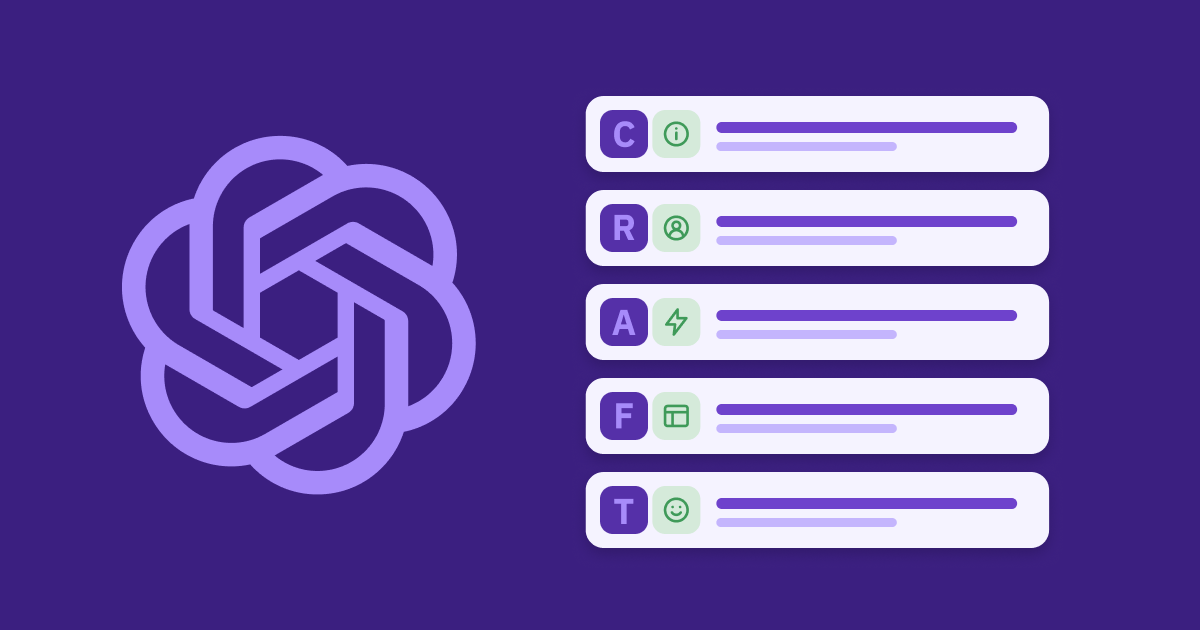
A vague request usually produces a generic draft. You can improve the result by building the prompt around CRAFT: Context, Role, Action, Format, and Tone.
- Context: Explain the audience, relevant background, and constraints without exposing personal data.
- Role: Give the model a useful perspective, such as an HR compliance specialist or senior recruiter.
- Action: State the task with a clear verb and break complex requests into steps.
- Format: Ask for a memo, table, checklist, script, or another preferred output type.
- Tone: Name the voice the situation requires, such as direct, empathetic, or formal.
As Buatti puts it, "So don't just ask AI for help. Ask AI for an expert."
Here is how that structure changes a sensitive drafting request.
Risky prompt:
Write a performance improvement plan for Dana in our Denver sales team. She closed 41% of her quota last quarter and missed three client deadlines in March.Safer prompt:
Act as an HR business partner experienced in performance documentation in the state of Colorado. Draft a 30-day performance improvement plan for a sales leader who is below quota and has missed several client deadlines. Include measurable goals and results, weekly check-ins, and manager support. Use a direct, supportive tone and format the draft as a one-page memo with headings.The safer version keeps enough context to produce a useful starting point while removing the person's identity, location, and exact performance record. You would still need to replace generic goals with accurate expectations, check the language against policy and law, and involve the appropriate HR leader.
Save prompts that work. A ChatGPT Project, a custom GPT approved by your organization, or a simple internal prompt document can keep you from rebuilding the same instructions every month. Reuse the structure, then update the context for the task at hand.
How to review AI output before using it
ChatGPT can produce inaccurate information with a confident tone. In fact, there is a term for this: AI hallucination, or confident hallucination. This happens because AI systems generate responses by predicting the next most likely text based on patterns learned from data (often from the vast internet). They are not inherently fact-checking every statement they produce. This is why, particularly for HR work, a quick skim is not enough. Review every draft across three areas before it leaves your desk or when preparing a recommendation or to make a decision:
- Facts, laws, and policies: Verify every legal reference, date, company policy, and factual claim against an authoritative source.
- Fairness and bias: Look for assumptions about age, gender, disability, education, location, or other characteristics that could distort the result.
- Tone: Read the draft aloud. Check whether it sounds like your organization and respects the person receiving it.
Another note: make sure you fully understand the output before making recommendations. Increasingly, it is being observed that people are copy-pasting AI output and are unable to explain or defend their perspective or position on the output, recommendation, or decision. At the end of the day, your reputation and accountability as an HR professional remain yours to keep.
When an output is generic, revisit the prompt before spending ten minutes polishing the prose. More useful context, a clearer role, or a defined format often fixes the problem faster. The more times you need to re-prompt the model, the better indication you should return to the CRAFT framework and ensure you're spending enough time thinking in advance of prompting.
You can also ask the model to challenge your assumptions. This is perhaps one of the most powerful uses of generative AI. For example, assign it the perspective of a skeptical employee and ask why a proposed policy announcement may land badly. Treat the response as a set of questions to examine your own judgment.
High-consequence documents need a firmer stop. Do not use AI-generated language in a termination letter, disciplinary action, or accommodation denial without HR leadership review and, when appropriate, advice from counsel. If time is tight, verify the facts, legal references, and policy language first.
Where ChatGPT stops being the right tool
A practical boundary is the type of decision involved. When AI contributes to a decision about hiring, pay, promotion, discipline, termination, or other consequential employment matters, qualified people must remain responsible for the process and the outcome.
Some HR work depends on context that a model cannot reliably read. Conflict resolution, sensitive coaching, crisis support, and conversations about a person's performance require empathy, trust, and situational judgment. AI may help you prepare questions or organize notes, but it should not conduct the relationship or decide the outcome.
The broader effect of AI on HR headcount is still developing. SHRM's 2026 research found that organizations using AI reported more shifts in responsibilities and upskilling than job displacement. That supports a careful conclusion: AI is changing HR work, while the human parts of the role remain central.
Your expertise is what tells you whether the draft is accurate, fair, appropriate, and safe to use. Build skills with the tool so you can apply that expertise earlier in the process.
Laws already govern AI in employment decisions
AI employment rules are already in force in some jurisdictions, and more are taking effect. They do not all cover the same tools or require the same actions.
| Jurisdiction | What the rule covers | Timing |
|---|---|---|
| New York City, Local Law 144 | Bias audit, public summary, and advance notice for covered hiring or promotion tools | Effective January 1, 2023; enforced since July 5, 2023 |
| Illinois, HB3773 | Bars discriminatory AI use in employment decisions and requires employee notice | Effective January 1, 2026 |
| Colorado, SB 26-189 | Notice and human-review rights for covered automated decisions, including employment | Effective January 1, 2027 |
New York City's law applies to covered tools that substantially assist or replace discretionary screening decisions for hiring or promotion. It requires an independent bias audit within the prior year, a public summary, and notice at least 10 business days before use. Civil penalties range from $500 to $1,500, and each day of use may constitute a separate violation.
Illinois prohibits AI use that has a discriminatory effect in areas including recruitment, hiring, promotion, discipline, and discharge. It also prohibits using zip codes as a proxy for protected classes and requires employers to provide notice when they use AI for covered purposes.
Colorado's enacted 2026 law applies to automated decision-making technology that materially influences consequential decisions, including employment. It requires notices, gives affected people the right to request meaningful human review after an adverse outcome, and is in the process of implementing rulemaking before its 2027 effective date.
The EU AI Act also classifies specified employment and worker-management systems as high-risk, including systems used for recruitment, promotion, termination, task allocation, and worker evaluation.
A drafting assistant and a system that scores candidates do not play the same role in an employment process. The legal definitions focus on how a tool influences a consequential decision, so confirm the rules for your jurisdiction and tool with counsel. Work with legal, IT, and security to decide what data may be shared, which uses are approved, and where audits or human review are required.
Your first two weeks with ChatGPT in HR
You do not need a broad AI rollout to begin carefully. Start with one account decision and two low-risk tasks.
- Confirm the approved account. Ask which tool you may use for work and what data is permitted. If the answer is unclear, keep all prompts non-sensitive and anonymized.
- Choose two recurring tasks. Try a job description draft, a plain-language policy summary, an onboarding email, or an HR SOP cleanup. For a broader rollout sequence, see our step-by-step guide to using AI in HR.
- Build and save one CRAFT prompt for each task. Update the context each time rather than starting from a blank request.
- Use the same review every time. Check facts and policies, fairness, and tone before using the draft.
- Review the experiment after two weeks. Keep the tasks that saved time without adding unacceptable risk or editing work.
Consistency matters more than the number of experiments. Among HR professionals at organizations that had implemented AI, SHRM found that 26% used it weekly, 20% daily, and 9% several times a day. A narrow, repeatable workflow gives you better evidence than trying every feature once.
If you want structured practice and feedback, our AI for HR Professionals course applies these skills to real HR roles and workflows. This course was designed with you in mind: For HR professionals, by HR professionals. We know that many HR teams are being asked to use AI and help their organizations do the same. This course helps you to lead that change.
Start by confirming the account you are allowed to use. Every other decision depends on that answer.
FAQ: Using ChatGPT in HR
Is it safe to put employee information into ChatGPT?
Remove names, IDs, contact details, exact compensation, demographic data, medical information, and other identifiers first. Business and Enterprise accounts exclude business content from model training by default, but your employer's policies, retention settings, and access controls still apply.
Will ChatGPT replace my HR job?
AI is changing HR tasks, especially routine drafting and process work, but current evidence does not support a simple replacement story. Conflict, sensitive coaching, and consequential employment decisions still depend on human judgment and accountability.
What is the difference between a personal and business ChatGPT account?
The default data treatment and administrative controls differ. Personal ChatGPT use depends on your data-control settings, while Business and Enterprise content is excluded from model training by default and is governed by workspace policies.
Are there laws about using AI in HR decisions?
Yes. New York City and Illinois already regulate covered employment uses. Colorado's new law takes effect on January 1, 2027. Other jurisdictions have their own rules. Consult with counsel to check the law that applies to your location and AI tool.
What should I use ChatGPT for first in HR?
Choose one low-risk task you already repeat, such as a job description draft, policy summary, onboarding email, or SOP cleanup. Save the prompt, review every output, and expand only after the workflow proves useful.


 Your Learner Success Advocate
AUTHOR