Key takeaways
- Start with a task you already understand.
- Choose work with dependable inputs and an output you can check.
- Keep buyer judgments, commercial commitments, and approval to send with the seller.
- Give AI the context and boundaries it needs for each task.
- Test the finished work, including your review effort, before expanding the workflow.
A buyer has told you what matters, but their priorities are scattered across your notes. Bringing that information together for the next conversation, follow-up, or proposal is a practical place to learn how to use AI for sales. Start with one recurring task, supply the relevant information, and use your sales experience to judge the result.
This guide helps you choose a starting task, work through a complete example, and decide whether the result earns a place in your day.
Where AI helps in the sales process and where you need to focus
An account summary, meeting questions, or a draft follow-up can make a promising first task. Each turns information you already have into work you can inspect. The key is having dependable sources and a chance to correct mistakes before a buyer sees them.
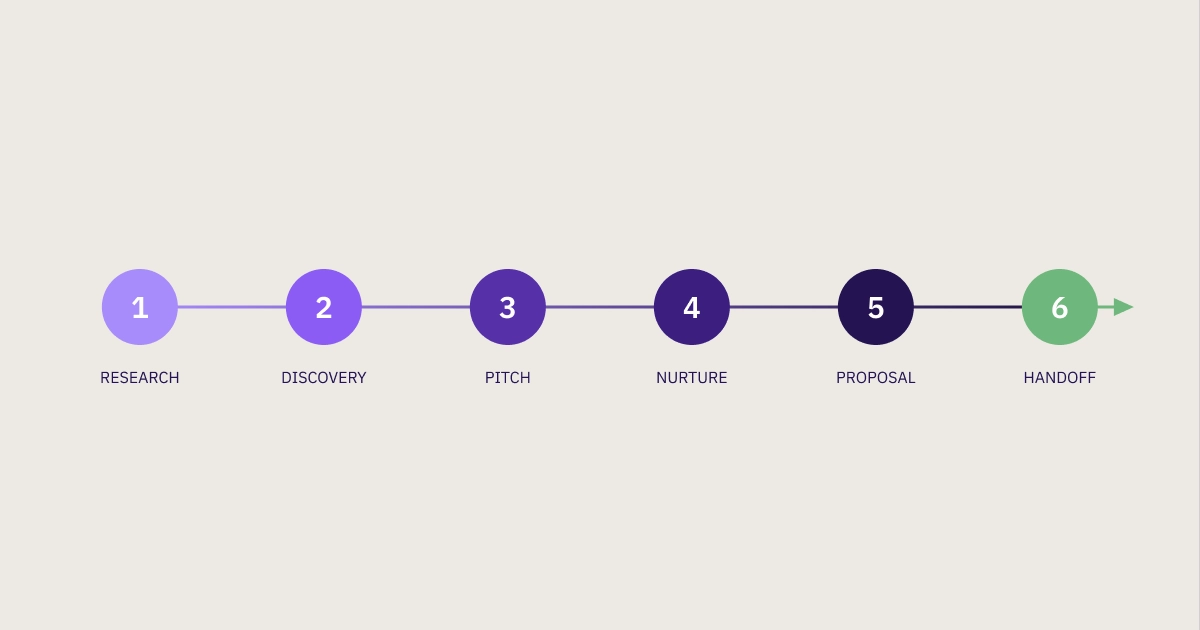
Your pipeline is the series of stages you already use to move a prospect toward a decision. At each stage, consider what AI could prepare and what you need to decide yourself. Use the table to choose a manageable first trial based on the information available and the consequences of an error.
For a prospecting trial, you could ask AI to compare a supplied account list against customer fit, timing, the relevance of the contact, and the problem your offer addresses. Ask it to explain each recommendation so you can examine the reasoning. An account may look like a strong match on paper, while something you know about it makes outreach premature.
Further along the sale process, your knowledge of the buyer still shapes what happens next:
- A service-business owner can prepare from a customer’s stated priorities. An unconfirmed buying deadline still belongs on the list of questions.
- An account manager can draft a nurture message from previous contact. Whether another meeting request makes sense depends on the relationship.
- A seller can compare a call transcript with a discovery checklist. An unanswered question is a reason to investigate, not sufficient grounds for a forecast.
Negotiation preparation and possible objections are also areas where AI can assist. But if using its answer would mean accepting an unsupported judgment or making a costly commitment, choose a narrower task for your first trial. Sending messages, changing records, and taking other connected actions each need their own approval decision.
Before starting, confirm which tool and source material you’re authorized to use and keep the result in your existing notes or tracker - you don’t need a formal CRM yet.
Build and test one AI-assisted sales workflow
Choose a candidate from your own sales process, then work through what it needs, how to run it, and whether the result is worth keeping. The following example follows a business owner preparing for a customer conversation. The same decisions apply to account research, follow-up, and proposal work.
Step 1: Choose one recurring sales bottleneck
Think about the sales work you regularly redo, put off, or piece together from several places. A useful first candidate is something you understand well enough to judge when it’s done properly. Once you’ve chosen it, look at what keeps getting in the way.
Use a few recent examples of that task to answer these questions:
- What activity was difficult to complete?
- What went wrong: gathering information, interpreting it, drafting, or following through?
- How did that affect the next conversation or buyer action?
- What caused the difficulty?
- What could AI prepare, and what would you still need to decide?
If your outreach gets little response because the accounts aren’t a good fit, polishing the email won’t solve the problem. Similarly, when follow-ups are inconsistent because nobody recorded the agreed next action, that missing information needs attention before a draft can help. Identifying the cause tells you what to ask AI to prepare.
Imagine you run an office-services business and keep rereading notes before a second conversation to reconstruct the customer’s priorities. That gives you a specific task to try and a clear goal: “Prepare a buyer brief from approved notes so I can address the known concerns and ask about what’s still missing.”
Before changing your approach, record how you do the task now: the preparation it takes and the details you tend to overlook. The task should be one you expect to repeat, with a finished output you’re qualified to check. Those observations will give you a basis for deciding whether the new approach is worth keeping.
Step 2: Map the inputs, output, and review point
For the buyer brief, AI needs the customer notes and approved offer details, along with a clear description of what to produce. Write those requirements down before opening any tool. You can reuse this workflow map instead of explaining the job from scratch each time.
Complete these five fields for your chosen task:
Gather current notes and the offer details that matter to this customer, including the offer’s limits. Keep that set of source material small enough to review. A large export of unrelated records gives you more to sort through without helping answer the main question.
Remove unnecessary personal information and identifiers, and follow your company’s rules for approved tools and data handling. Removing names alone doesn’t establish that you’re authorized to upload a document.
Decide now what you’ll check in the finished output. In the buyer brief, every stated priority should point to a source note, and unanswered questions should stay visible. A prospect list calls for checking the reasoning against your fit criteria; a follow-up calls for checking the agreed next action and tone.
Step 3: Choose a tool that fits the task and your access
With the task defined, choose the simplest approved tool that can use your source material and produce the output you need. The main decision is how it will get the context: from material you supply yourself or from records it can already access.
- A general assistant: ChatGPT can draft and summarize supplied material, which makes a brief or message a reasonable task to try. This is a practical option for a manual trial when you can provide the approved notes yourself.
- AI within your existing sales tools: Consider this route when the relevant information already lives in your CRM or email system. Microsoft’s Sales pane in Outlook shows CRM references and email citations in generated drafts. HubSpot’s prospecting guide includes preparation prompts using CRM context.
- A connected workflow: Consider linking tasks after you understand how each one should run and be reviewed. First establish that you want the output often enough to justify the setup.
Check access at the feature level. Microsoft’s email drafting feature requires administrator enablement and supports specific CRM record types; it can’t use CRM notes or activity history. HubSpot lists additional subscription and credit requirements for certain prospecting features. Check the linked instructions against the task you’ve chosen.
Choose one tool and a way to provide the inputs that lets you inspect the result. Manually pasting authorized source material is a valid first trial; decide whether integration is worthwhile after reviewing the output.
Step 4: Run a small task with a clear prompt
Now prepare a buyer brief from the notes and requirements you’ve mapped. The fictional example below shows the method from source notes through prompt to sample output. The sample output is an authored illustration, rather than an observed model response or customer result.
The source notes
Imagine you’re preparing for a second conversation about an office-service contract.
Note A: First customer conversation
The buyer requested evening service for two offices, raised concerns about reliability, and asked for a written proposal after the next conversation.
Note B: Approved offer details
The service includes an “Office close checklist” and a designated escalation contact. No price, start date, or service guarantee has been approved.
The notes establish the broad service need and give AI specific material to organize. They also show what the brief can’t establish: the details needed for a commercial commitment are still missing.
A prompt you can adapt
Paste the notes into your approved tool with this instruction:
Prepare a one-page brief for the next buyer conversation.

Use only notes A and B below. Include:
1. Confirmed buyer priorities, with a reference to the supporting note.
2. Relevant offer details supported by note B.
3. Information that is still unknown.
4. Three questions to ask in the next conversation.

Keep assumptions separate from confirmed information. Don't invent prices, dates, promises, buyer quotes, or approval authority. If the notes don't establish a detail, label it unknown.

Note A:
The buyer requested evening service for two offices, raised concerns about reliability, and asked for a written proposal after the next conversation.

Note B:
The service includes an "Office close checklist" and a designated escalation contact. No price, start date, or service guarantee has been approved.
What a usable first output could contain
Confirmed priorities: Evening service for two offices and concern about reliability. The buyer wants a written proposal after the next conversation. Source: Note A.
Relevant offer details: The Office close checklist and escalation contact are available to discuss. Source: Note B. The notes don’t establish that these arrangements fully answer the buyer’s reliability concern.
Unknowns: Exact service window, what reliable service means to this buyer, who approves the proposal, price, start date, and any requested guarantee.
Questions for the conversation:
- What would reliable service look like at each office, and what problems are you trying to avoid?
- Who needs to review and approve the proposal?
- What evening service window and start timing would work for you?
Asking only to “write a sales pitch” leaves the tool to choose what deserves emphasis. Here, the prompt identifies the buyer’s known concern, limits the evidence AI can use, and requests questions to help you prepare for the next discussion.
The same pattern carries over to other sales tasks by changing the source material and requested output:
- For a prospect list, supply account facts and fit criteria, then request a comparison with reasons.
- For a nurture message, supply the last interaction and a relevant update, then request a draft with one appropriate ask.
- For a proposal section, supply the buyer’s requirement and approved offer language, then request a response that preserves the offer’s limits.
- For a deal review, supply the conversation record and your discovery checklist, then request unanswered questions with supporting references.
Save the first output alongside its source notes so you can review the two together before using the brief in the conversation.
Step 5: Review the output before using it with a buyer
Open the brief and its source notes together, then check every statement that could shape the conversation. Its source must support what the statement actually says.
The example’s notes support evening service and a concern about reliability. They say nothing about needing service to start next month. If that deadline appears in the brief, delete it or find a source that establishes it; “probably next month” would still leave you preparing around a guess.
A stakeholder-brief demonstration in the AI for Sales Professionals course shows this problem through a fictional scenario: a plausible quotation attributed to a CFO can’t be verified and is removed. Apply that lesson to buyer details as well as quotations. If the output has invented information, correct the instruction and check the next version for the same error.
Check the message, decision, and saved result
Source checks establish what you can support. Review what depends on your judgment, too:
- Buyer context: Does this concern belong to this customer and this opportunity?
- Message and ask: Would you say this aloud, and does the requested next action fit the last interaction?
- Recommendations: Can you explain a prospect ranking or deal concern using the supplied criteria and evidence?
- Commitments: Has anything introduced an unapproved price, date, guarantee, or responsibility?
Read customer-facing drafts aloud and replace anything you wouldn’t say. Even an accurate message can ask for too much or sound unlike the person the buyer knows.
Check the selected record in connected tools, too. Microsoft’s Sales pane instructions describe changing an incorrectly selected opportunity and generating the draft again. If your workflow also saves a note, creates a task, or changes a record, inspect the saved result separately before considering that action complete.
Step 6: Test whether the workflow helps, then expand
One reviewed output gives you something to assess. Repeat the task on a small set of comparable examples, then compare the finished work with your usual approach. Count the time and attention needed for checking and editing as well as generating the draft.
Keep a short record for each attempt:
For the office-services example, did the brief bring the reliability concern into the conversation and help you establish the missing service details? Those observations tell you something about the work’s usefulness. They don’t, by themselves, prove that AI caused a sale.
Let the results determine whether to keep, revise, or stop the trial:
- Keep a workflow when the finished work is useful and the preparation and review effort is worthwhile.
- Revise the source packet or prompt when the output repeatedly misses context or stays generic, then test again.
- Continue manually when correcting the output takes more effort than doing the task yourself.
When the approach earns a place in your routine, save the prompt, the input checklist, and the checks the output needs to pass, along with who’s responsible for reviewing it. Then choose one adjacent task: a reviewed meeting brief could inform a follow-up draft, or a reviewed prospect comparison could inform one outreach message.
A successful trial leaves you with a repeatable task and evidence to guide your next choice. As you connect tasks, preserve the review that made the first one worth keeping.
Other ways to use AI in sales
- Practice objection handling: Ask AI to play a specific skeptical prospect with a defined concern and stay in character while you respond. Request feedback after the role-play, then use your knowledge of the buyer to judge which suggestions are worth practicing.
- Organize RFP requirements: Turn an authorized-for-use request for proposal (RFP) into a requirement checklist with source references, mandatory or desirable status, and conditional wording. Check each item against the original document and take unclear requirements back to the buyer.
- Prepare a customer handoff: Use authorized sales notes, recap emails, and agreed actions to draft a one-page internal brief explaining why the customer bought, what success means to them, and what’s in scope. Add relevant context missing from the records and ask the receiving team to review it before the handoff.
FAQ: using AI in sales
Can I start without a CRM?
You can start with authorized notes, approved offer details, and an AI tool your company permits. Keep the source material and reviewed output in your existing notes or tracker so you can check the context and reuse the approach.
Can I use customer information in the prompt?
Remove unnecessary personally identifiable information and customer identifiers before preparing your prompt. Use only information you’re authorized to share in a company-approved tool; removing names doesn’t override restrictions on confidential material.
Can I trust AI lead scores or deal forecasts?
You shouldn’t treat a generated score or forecast as a validated prediction. Check the underlying evidence, criteria, and missing information against your own account knowledge, and validate any predictive use separately before relying on it.
Should I let AI send messages automatically?
Keep send approval with a person while you’re testing the workflow. Automatic sending is a separate decision that requires an approved process for what can be sent, to whom, and how errors or exceptions will be handled.
AUTHOR