Key takeaways
- Getting into (or improving) AI automation starts with a task you understand.
- Understand the work well enough to explain the goal and provide useful context.
- Let AI propose an approach, carry out work, and adapt to your direction.
- Review what matters, clarify gaps, and keep the guidance that improves results.
- Measure the effort left for everyone who uses the result.
The best way to get into (or better at) AI automation is to choose a recurring task you understand, define the result you need, and work through it with an AI assistant. Explain the goal in ordinary language, give it relevant context, and steer the work as it develops. If you’ve already built an automation but spend too much time correcting its output, the same approach can help you find what needs to change.
This guide follows one example: handling an incoming project request. With Claude or ChatGPT, that could involve reviewing the request and supporting material, identifying what’s missing, preparing useful documents, and helping you decide what to do next. The work can change as new information arrives.
The foundations you’ll use in an AI workflow
An AI workflow connects the work needed to reach a goal. With an AI assistant, you can describe that goal and ask it to work out an approach, use the context available to it, and carry out the parts its tools support. You can ask questions, correct a misunderstanding, or change direction along the way.
For a project request, the goal might be to get it ready for the team to assess and act on. One request may need clarification before much can happen; another may contain enough information for the assistant to prepare a project brief, outline the requested document, and draft a response. The useful result depends on what the request needs.
Three things give the assistant direction:
- Purpose: What are you trying to accomplish, and who needs the result?
- Context: Which messages, documents, examples, and constraints explain the work?
- Judgment: What can the assistant work through, and which decisions need your input?
You can start with material you supply in a conversation. Access to other apps and the ability to take actions depend on the tool and connections you have enabled. A recurring task can also benefit from saved context and instructions, so you spend less effort explaining the same background each time.
[[cta-big]]
A practical framework for starting and improving AI automation
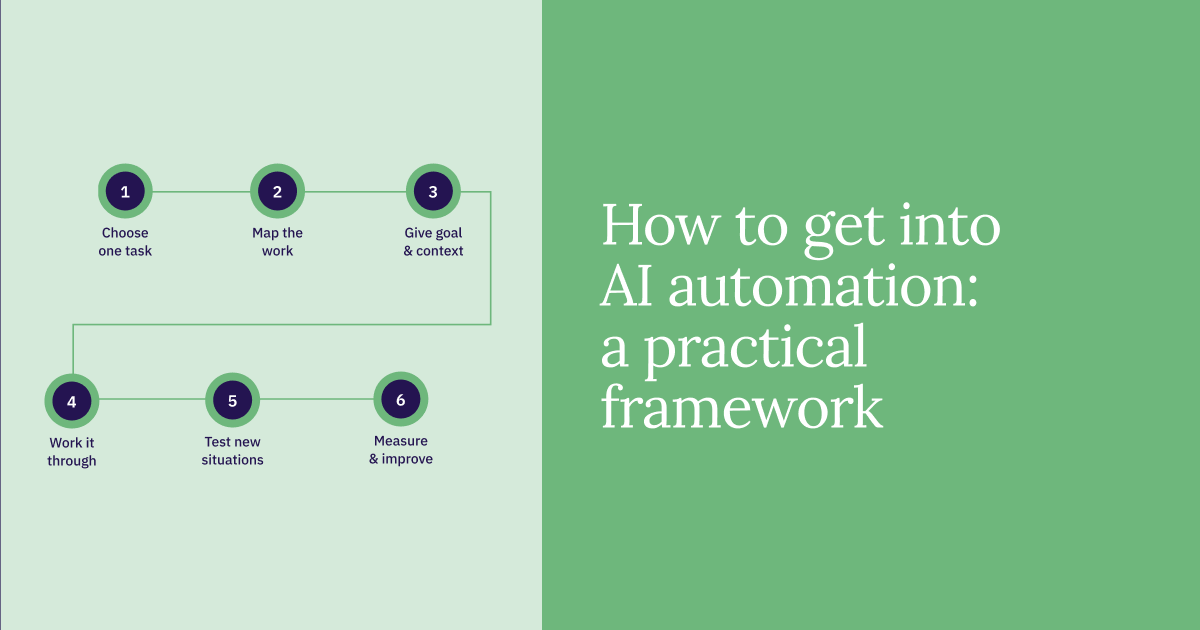
The following steps help you learn how to direct AI through useful work. You’ll likely move back and forth between them as you discover missing context or a better approach; you don’t need to follow them in the same order for every task.
Step 1: Choose one recurring task and define a useful result
Start with work you understand well enough to judge. Look for something that regularly takes effort to interpret, prepare, or coordinate, and describe what would make it easier for the person responsible. If you already use AI, choose work where you keep stepping in to correct the same problem.
For project intake, a useful goal could be: “Help the coordinator get this request ready for the team to act on.” That leaves room for different kinds of help: understanding the request, finding gaps in the supplied material, preparing a brief, or getting a first draft underway. You can narrow the scope when necessary, such as keeping decisions about accepting the project with the coordinator.
Make the goal concrete by describing what success looks like. The coordinator should understand what’s being requested, know what still needs resolving, and have useful material for the next action. Note how much effort this takes now, including follow-up and corrections, so you can later tell whether AI is helping.
Step 2: Map the work as it happens today
Use a piece of paper or a few notes to understand the work you’re asking AI to help with. Focus on the information, decisions, and dependencies that matter. This gives you context to share and helps you recognize when the assistant’s proposed approach misses something.
For the incoming request, you might notice that:
- The original email explains the need, but a later message changes the deadline.
- Project guidance names the intended audience and the person who approves the work.
- An existing document may answer the request, making a new draft unnecessary.
- The coordinator sometimes needs clarification before deciding what to prepare.
Susan Morrow, an instructor for our AI Automation course, explains: “Process mapping is a way that we visualize these steps, and it can really help to uncover hidden complexity.” In this example, the map reveals why the first email alone may be insufficient. If someone else handles or receives the work, ask what they usually look for and where requests get held up.
The map helps you explain the task without scripting every move. Once the assistant sees the request and the relevant context, you can ask it to suggest how to proceed. It may be more useful to compare an existing document with the request before preparing anything new.
Step 3: Give AI a goal, context, and room to work
Describe the outcome you want and let the assistant help determine how to get there. Include the material that explains the task, any preferences that matter, and decisions it should bring back to you. OpenAI’s prompting guidance recommends using your own words, starting with the result, and leaving room for the tool to work through an approach.
For the running example, you could start with:
Help me get this project request ready for the team to act on. Use the request, the message thread, and the project guidance I’ve provided to understand what’s needed and what already exists.

Suggest a sensible approach, then prepare the material you can from that context. Ask me about gaps that would change the work, and make clear what still needs a decision. Keep the coordinator’s next action easy to see. Check with me before committing the team to a deadline or sending a response.
Suppose the request says, “Could you put together a one-page overview of the new onboarding process?” The assistant might find an existing outline in the supplied documents, identify that the audience is unclear, and propose adapting the outline once that question is resolved. You can answer the question or ask it to show what would change for different audiences.
You don’t have to predict every branch of the work in the opening instruction. What matters is giving the assistant enough direction to make progress and enough context to recognize where your input would change the result.
Step 4: Work through the task in conversation
Try the task in Claude or ChatGPT using an example and material you’re permitted to share. Give the assistant the goal and relevant sources, then respond to its proposed approach or the work it produces. You can ask it to explain a choice, use another source, or continue with a promising direction.
For the onboarding request, an exchange could develop like this:
You: The overview is for new managers. Use the existing onboarding guide and prepare a first draft focused on their responsibilities.
AI’s proposed direction: Adapt the guide into a one-page manager overview, highlighting what managers need to do before and during a new hire’s first week.
You: The team has just changed the process. Use this updated checklist as the current source. Before drafting, show me where it conflicts with the old guide.
You, after reviewing the comparison: The checklist is correct. Draft the overview using it, flag the one unresolved ownership question, and prepare a short note explaining what changed.
The goal stays useful while the approach changes with the information available. The assistant can carry the connected work forward from comparing sources to drafting the overview and preparing the change note. Your input resolves the conflict that would otherwise affect all three.
As you find an approach that works, keep the background guidance that will help with similar tasks: the team’s purpose, current reference documents, writing preferences, and decisions that need review. Projects in ChatGPT and Claude offer a place for reference files and instructions across related chats. Keep that context current while letting each new request determine the work needed.
Step 5: Check how the approach handles different situations
Use a few varied requests to learn where the assistant needs better direction. A clear request, an incomplete one, and a thread with a change of plan will reveal different weaknesses. Judge whether the work helps you move forward, allowing the form of the result to vary with the situation.
Useful questions include:
- Does the work reflect the current source material, including corrections and changed dates?
- Does the assistant distinguish a fact in the source from an assumption or suggestion?
- Does it ask about a gap that matters, or interrupt you for details it could already find?
- Does it adapt when the request changes, including updating work it prepared earlier?
In the onboarding example, check whether the revised overview follows the new checklist throughout. If it keeps an outdated responsibility from the old guide, point to the conflict and ask the assistant to check the rest of the draft for the same issue. Then improve the recurring guidance if the problem is likely to return, for example by identifying which reference takes precedence.
Match the depth of review to the consequences. A draft for your own use may need a quick source check; a message that commits the team to a delivery date needs the responsible person’s review. Keep examples of recurring mistakes when they help you check an improvement, without turning every routine use into a formal testing exercise.
Step 6: Measure the useful result and improve one weak point
After using the approach a few times, compare the effort with your starting point. Include the work left for everyone who uses the result. For project intake, useful measures might include time spent resolving gaps, corrections needed before the team can act, and unnecessary follow-up questions.
The AI Automation course illustrates this problem with fictional Atlas Fleet Services: an automated service-request process makes logging easier but still sends some low-priority messages to managers, adding review and distraction. For your intake task, ask the coordinator what has become easier and what still sends them back through the original messages.
Michelle Lentz, an instructor in the AI Automation course, describes “practical metrics that really mattered to different people in the company” while discussing the fictional Soundwave teaching scenario. For your task, that might mean tracking how often someone must correct the prepared material before they can use it. A count of generated documents won’t tell you that.
Improve the part that keeps getting in the way
Let the repeated problem guide the change. If the assistant asks questions already answered in the references, improve the context or ask it to review those sources before seeking clarification. If the output is accurate but cumbersome, explain what the recipient needs to do next and ask for a more useful form.
You can also change the scope. If preparing a brief is useful but leaves you doing the same follow-up work each time, ask the assistant to carry that work further, such as preparing the supporting document and a response for review. Check whether the added help reduces total effort, then keep the guidance that made the difference.
Level up with connected sources when they help
If gathering context takes most of the effort, an optional next step is connecting an app such as Gmail or Slack where your assistant supports it. ChatGPT’s plugins and Claude’s connectors can give the assistant access to connected sources for relevant tasks. You might ask, “Find the latest messages about this request and update the brief with any changed requirements,” then continue working from that context.
Check which sources and actions the connection supports and authorize the access needed for the task. Retrieving messages on request doesn’t by itself set up ongoing inbox monitoring. You can gain useful automation skills with supplied material first, then add connections when they remove a recurring obstacle.
Don’t know where to start? Here are some things you can automate
These examples draw on AI Automation coursework. Evergreen and NovaTech are fictional teaching companies; the suggestions below adapt those scenarios into work you can explore with an AI assistant. Use invented or permitted material, explain the goal, and let the conversation develop around what the task needs.
Sort incoming email into useful categories
One of the course's lessons uses sorting incoming email into folders as an example of an automation’s intended purpose. You could explore that problem by asking an assistant to help you work out which messages need attention, using a set of messages and an explanation of your responsibilities.
Have it suggest useful groupings and identify unclear or edge cases. If it treats every copied message as something you need to answer, explain when you’re responsible and ask it to reconsider. You can then ask it to prepare replies for the messages that need them or pull together the actions you need to take, checking that its priorities match the actual requests.
Draft social captions from an organized content bank
Another marketing scenario connects a content bank and calendar with AI-drafted captions, human review, and scheduling after approval. To explore the creative work, give the assistant campaign material, the intended audience, and your goal for the next set of posts. Ask it to propose an approach and develop suitable captions from the available content.
You might redirect it toward a different audience, ask which source best supports a proposed claim, or have it adapt a promising idea for another post. Review the facts and message before approving content for publication. The context and feedback you keep can help shape the next round of work.
Pull useful information from a messy data export
This exercise starts with a messy lead spreadsheet and extracts essential columns for further work. You could give an assistant a permitted export and explain what you need to understand or prepare from it, such as which inquiries have enough information for follow-up.
Ask it to inspect the data, propose how to organize the relevant information, and flag unclear labels or missing values. If a column’s meaning is ambiguous, clarify it before continuing into analysis or preparation of a working table. Compare the result with the original to catch dropped entries or details assigned to the wrong company.
Turn recurring customer feedback into themes for review
Here, a scenario proposes gathering a week’s complaints, analyzing them with AI, and sending a summary to the customer-service team. You could ask an assistant to help the team understand a batch of feedback, keeping source examples beside the themes it identifies.
If a broad theme hides a useful distinction, ask it to separate the issues and reconsider the evidence. You can then direct it to prepare a discussion brief or investigate a question within the supplied feedback. Check that the resulting recommendations follow from the messages and preserve important exceptions.
Qualify an inquiry before arranging a meeting
This final demonstration classifies a form request and prepares a concise summary for an engineer, with a calendar event created only after the engineer confirms the appointment request. You could ask an assistant to help assess an inquiry against the team’s work and prepare what the engineer needs to decide whether a meeting would be useful.
That may involve comparing the inquiry with service information, identifying a question for the sender, or drafting an agenda when the fit is clear. If new information changes the assessment, ask the assistant to revise the recommendation and supporting material together. Keep the engineer’s confirmation before any meeting is booked.
Frequently asked questions
Do I need to learn coding before AI automation?
You can start without coding by directing an AI assistant in ordinary language: explain the goal, provide context, and guide the work as it develops. Coding or technical help may become useful when you need custom behavior or connections your tools don’t support.
How do I know what to learn next?
Let a recurring difficulty in your work guide what you learn next. That could mean giving better context, directing a more complex task, checking results, or connecting a source you regularly need. Apply what you learn to the same task so you can judge whether it helps.
Can I practice without using real work data?
You can practice with invented data, or remove personally identifiable information and other identifying details from permitted examples. Anonymization alone doesn’t establish approval to upload confidential business information, so use an approved tool and material you’re allowed to share with it.


 Your Learner Success Advocate
AUTHOR